We're (mostly) feature complete!
Development on this site started way back in July of 2025 and now after many many revisions, it's ready to be public. I included the asterisk in the title because I am always going to be improving this site and there's already so many things I'd still like to add, but I need to make it exist before I can make it 'perfect'. Details about what I'd like to still add are at the bottom of this post underneath the Roadmap section.
Ethos
I've wanted to create a space of my own on the internet for awhile now, but it has been overwhelming to get started on it... There are so many directions I'd like to take based on the inspiration gained from so many others which made it difficult to find an identity for this site. Plenty of friends have adorable 'Web 1.0' inspired pages with 88x31 banners and simple HTML, but I felt like this site required a more modern approach. Many sites today feel too 'cookie cutter' and smoothed over, similar to the trend of 'millennial grey' homes, they're not bad by any means, but they lack identity. Towing the line between expressive and sleek was a serious challenge building this site, but I think I've gotten it to a good state that can be easily improved upon if I feel the need.
From the beginning of making this site I worked to implement as many helpful tools as I could so that when it came time to writing content I wouldn't have to keep taking detours to implement certain features. Keeping in mind the possibility of different things I could add to the site helped create a modular system to support what I'd need, or at least make it easy to add those features down the road. To keep this in mind I wrote the following rough goals for the site.
- Allow deep dives into current projects.
- Host links to my email and socials like a digital business card.
- Let me write nuanced long form opinion pieces that wouldn't work well on social media sites.
- Display my varied portfolio of work: fursuit making, web development, microcontroller tinkering, etc.
- Link to other web projects of mine i.e. I'd love to make a nice sudoku app.
- Write about my experiences on trips with friends while showing photos from them.
- Allow me to really have fun and express myself! :3
Now being mostly done with LarkBarks development these goals have been met, though, I'd still like to push further in all directions to take it from meeting goals to exceeding them. Stay tuned. :3
Development ramblings
The following sections don't have much of a purpose beyond sharing the process of building the site, I apologize for the lack of flow.
Pelican
This site is made almost entirely from scratch using Pelican to generate all the final pages. The 'simple' Pelican theme was used as a starting point but almost none of the original code remains. When looking for ways to make my own blog I tried out Ghost but it was far too 'polished' and business-minded for my tastes. I wanted something where I could make the site itself on my own, but not have to manually write every page with just HTML. This decision was practically decided for me as Eevee had just updated her site when I started looking into this.
Pelican works by inserting written content into templates. Instead of writing every post directly in HTML I can write it in a markdown file which Pelican can parse into HTML. Since Pelican generates the HTML ahead of time it doesn't require the browser to generate the content every time its requested. This can also be automated with a Github Action so whenever I push a commit to Github it will generate the content and serve it via Github Pages automatically.
This takes this:
Pelican works by inserting written content into **templates**.
...and turns it into this:
<p>Pelican works by inserting written content into <strong>templates</strong>.</p>
Pelican can also nest templates within each other to avoid rewriting identical content over and over. For example every single page has the base.html template wrapped around it. This includes all the important header functions that import assets and set metadata and everything, while also setting up 3 'containers'; leftContent, centerContent, and rightContent. The leftContainer just imports the sidebar.html template, and the rightContainer holds the shadeSelector (also called the toneSelector). The centerContent container is dynamic and will accept whatever content is given to it whether thats a page, article, or a custom template.
Page sections
Between the major sections in this post there are gaps separating the boxes that hold the content. This is something that I wanted to use since the very beginning of this project, but I struggled to find examples of how to implement it online. It must exist somewhere out there, but the only thing I could find was linebreaks like the ones found in a novel.
A standard page with no separation is formatted as following:
<section>
    <div>
        <p>
            Page text
        </p>
    </div>
</section>
With the text being held inside a paragraph (<p>) tag it and other elements, such as images or codeblocks; get wrapped inside a divider (<div>) tag; which is then wrapped by a section (<section>) tag to hold everything. Each of these tags needs an opposing forward-slash tag show where the element ends, so to separate the sections these forward-slash tags need to be inserted. To achieve this, the function clean_break() can be called inside double curly brackets within the markdown file as shown:
<section>
    <div>
        <p>
            Section 1 text
{ { clean_break() } }
Section 2 text
</p>
</div>
</section>
After clean_break() is inserted it injects the following HTML to close all of the tags for section 1 and make new tags to start section 2:
<section>
<div>
<p>
Section 1 text
        </p>
    </div>
</section>

<section>
    <div>
        <p>
            Section 2 text
        </p>
    </div>
</section>
I'm quite happy with the final result as it really helps the hierarchy of the page.
CSS & JS
The things people can make with just CSS without any JS at all is insane. Rebane has a great blog post about how you no longer need JavaScript, and while the title seems extreme it makes the point that with modern CSS most basic websites just don't need JavaScript! With the Invoker HTML API that just recently became baseline as of Safari 26.2 even less JS will be needed.
The only JavaScript that this site uses is to animate Zoey and to update the site colors with the toneSelector, but I believe the toneSelector could be implemented with pure CSS.
I <3 Web Dev
It is truly incredible how far I've come with web development since starting this project. When I started, working with Pelican seemed so complex and intricate, but now on the other side I've fallen in love with it. I've gained so much knowledge for CSS and it makes me even more excited to continue using it. Having a good framework that can be expanded upon is so difficult to really understand until you've started. Designing this website isn't just building a single page, it's building dozens of pages with different sizes and amounts of content. It has been a far more involved process than I could have anticipated.
If you're considering building a site or blog just start. You'll figure out the details as you go and you can always remake things that could be better. Half of the development time making this site has been from realizing how something could be made better and doing it. First you have to make it exist, then you will make it 'perfect'.
With how volatile the modern social media landscape is I think there will be a return to the 'old-internet' bastions of forums and blogs. Social media is great for finding new people and seeing content you wouldn't otherwise see, but this comes at the cost of not being able to fully commit yourself to any one thing. I plan on writing more about this once I've gotten comfortable with this blog.
Roadmap
Gallery
Funny enough the button to access the gallery is fully implemented into the sidebar and the gallery page even displays "gallery is under construction!" when loaded, but I have the button element removed for now until I have it developed.
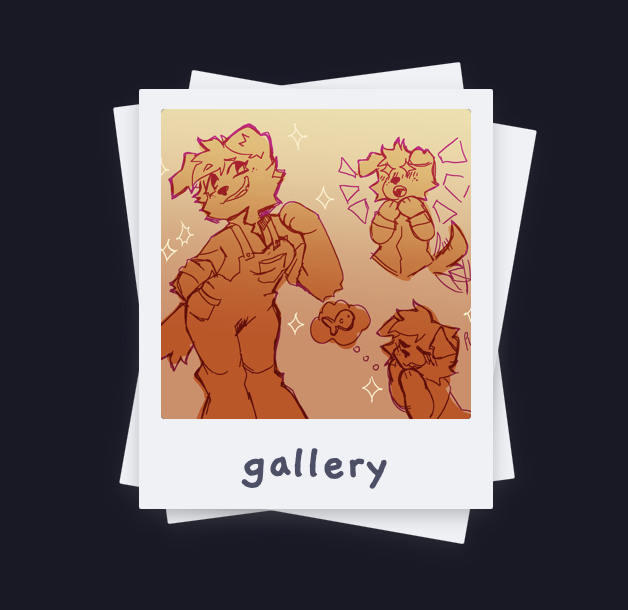
It will be nice to be able to host all of the art of Zoey that people have drawn, pictures from conventions I've gone to, and pictures of projects all in one place. I have some ideas for how to implement this with Pelican so that I can filter images by tags and such, but it will take awhile to fully work out all the issues with it.
Mobile compatibility
Making this site mobile-friendly isn't super high on my list of priorities because I feel as though a blog is best experienced on a proper monitor, but I'll admit being able to at least read the content on the site is important... Luckily I have been keeping this thought in the back of my head from the beginning and it really shouldn't be that hard to implement. All I'll really need is to make the sidebar collapsible when a mobile device is detected and then have the center content take up the whole screen.
For now the following text is displayed when a screen less than 600px wide is detected.
This website is intended to be viewed on a computer. The mobile version is under construction. Please view this site on a computer instead :)
Interactive Zoey sprite
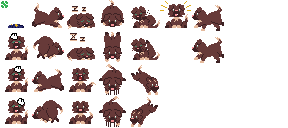
Zoey's sprites are based upon the desktop pet Neko which started out on old home computers but has been ported to countless modern programs and sites. I used oneko.js as a starting point to implement my own version, but I ended up writing my own functions and just using oneko.js as inspiration.
I love Zoey sleeping soundly on the sidebar (p.s. you can pet the dog), but I want to make it so that you can pick her up and have her sit on top of any onscreen element. I think it would be cute for her to jump up or down from section to section once shes close to the edge of the window. In the top left of her sprite sheet I have a tennis ball and a plushie that she could interact with eventually.
Project index
The amount of projects on the sidebar right now is perfectly acceptable, but I know it will quickly become a mess once I have more and more content on here. At some point I'll need an index of all the projects with a way to filter them along with a way to pin certain ones to the sidebar.
Optimization
The codebase for the site is pretty well slimmed down to just what it needs to be but I know there's plenty more I could improve on. A lot of the CSS could use some re-organization to remove unnecessary attributes or even a full restructuring from the ground up to slim it down further. The index HTML page is less than 14KB so it can be fit inside a single packet and thats enough optimization for the time being. Further improvements will come later.
If you've read this far, thank you. If just one single person reads any of my blog posts in full I consider it a massive success. Thank you.
Violet Lark
@CatKhakis
violet@larkbarks.com